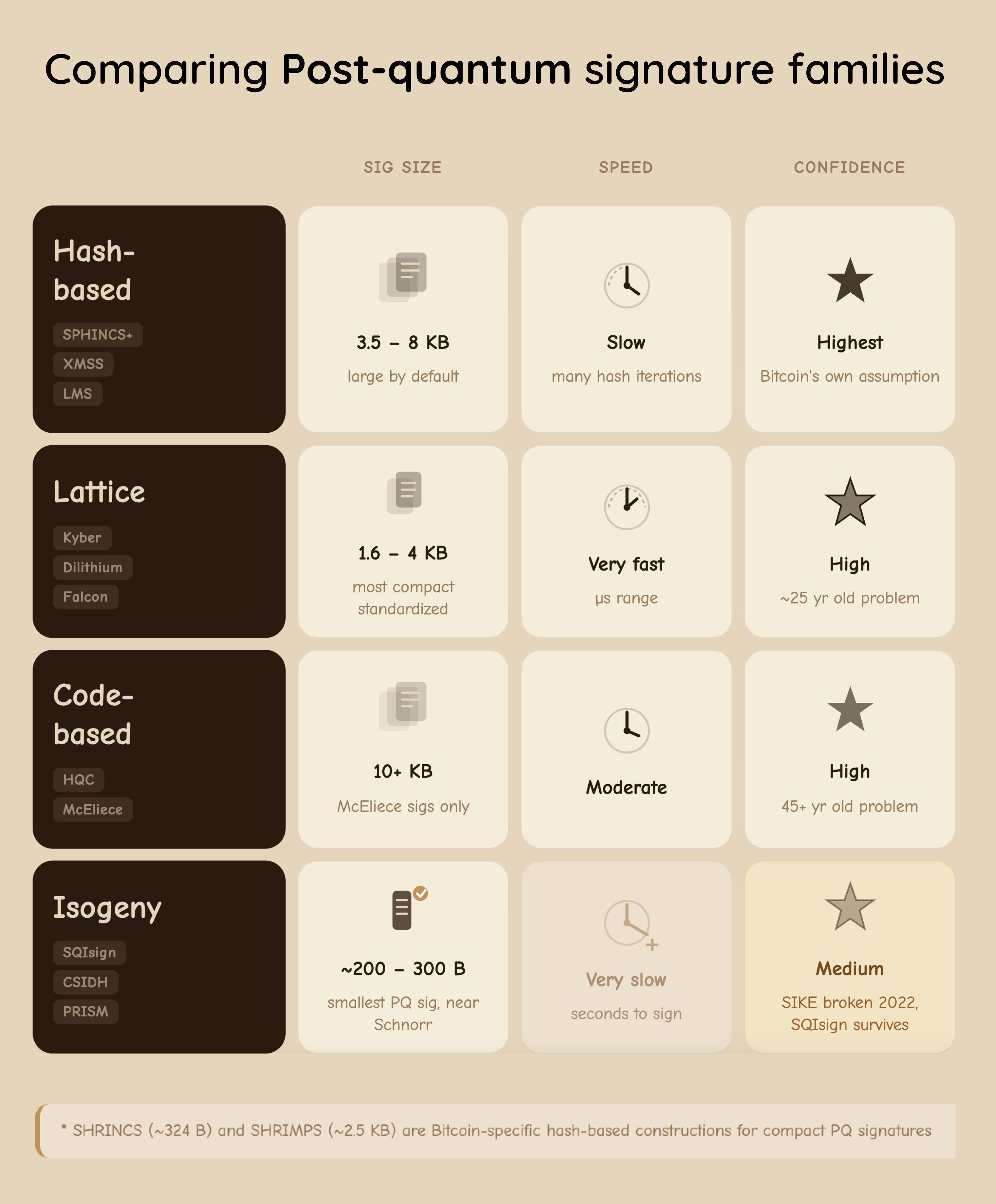
Interested in what #bitcoin could look like in a post #quantum world? As the community continues to research the optimal upgrade path, check out this comparison of post-quantum signature families:
- Hash-Based
- Lattice
- Code Based
- Isogeny

100% free and open-source resources for bitcoin devs. bitcoin + FOSS = ₿OSS
Filtering by: bitcoin · clear filter
Interested in what #bitcoin could look like in a post #quantum world? As the community continues to research the optimal upgrade path, check out this comparison of post-quantum signature families:
The ₿OSS Challenge is designed to get you started in a career in open source. Deadline to apply is tomorrow, December 31.
Don't overthink it. Apply now and change your life in 2026.
#bitcoin #softwareengineering #softwaredeveloper
12/30/2025, 6 engagements
Enlightening! Testing! Inspiring!
That is how 2025 alum Sangbida describes the ₿OSS Challenge.
When she took it she was working on corporate side of #bitcoin. Now she is funded by
to contribute to Core Lightning ⚡️
What’s stopping you? Start your career in bitcoin open source software (₿OSS) and change your life forever.
Applications close in 10 days on Dec 31. Program kicks off the week of January 12.
12/22/2025, 1 engagement
It can be tough to get into open source on your own.
When Marco started the ₿OSS Challenge he was trading options. Now he is funded by Brink to work on fuzz testing.
The program helped him navigate the large Bitcoin Core code base and decide where to focus his energy.
It provided actionable steps to bring him closer to becoming a #bitcoin open source contributor.
Don’t do it alone. Apply now for the ₿OSS Challenge.
#opensource #boss #foss #softwaredeveloper #softwareengineering
Want a career in #bitcoin open source but feeling intimidated?
Sangbida Chaudhuri and MacGyver talk about their experience on the Stephan Livera podcast transitioning from the corporate world to bitcoin open source development.
Join us for the bosschallenge.xyz and change your career in 2026.
12/17/2025, 2 engagements
The ₿OSS Challenge is back 🎉
Start your career in bitcoin open source software (₿OSS) and change your life forever.
Serious about a career in bitcoin open source software?
Do you dream of professional freedom? Do you want your work to have a profound impact? Are you looking for some of the most challenging engineering problems?
Take the ₿OSS Challenge and start yourself on a new path
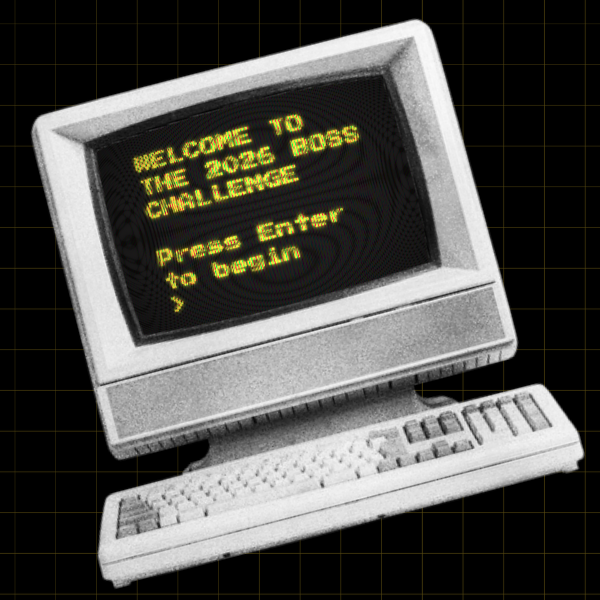
❓ HOW DOES IT WORK? ❓
The challenge kicks off the week of January 12
🗓️ 30 days to complete a series of code-based technical challenges
🛣️ 2 additional months for anyone willing to continue the adventure
If you are willing to do the work, we'll give you what you need to get to where you want to go.
🧑🤝🧑 LEARNING IS BETTER WITH FRIENDS 🧑🤝🧑
That’s why we’re delighted to announce ₿OSS Challenge partnerships with:
🌍 Live in one of these regions? Reach out to connect with others doing the ₿OSS Challenge!
Funding for bitcoin open source development is earned by demonstrating proof of work. There is no cheat code.
🧡 Come do the work and good things will happen. 🧡
The ₿OSS Challenge gives you structure while fostering the proactive, self-starter spirit that is required in open-source.
Join the challenge. See how far you will go. Change your life in 2026.
⏰ Applications close: December 31 🎯 Program begins: January 12 🌎 Open to everyone. Totally free.
Application: bosschallenge.xyz
#bitcoin
Buckle up for today's #DecodingBitcoin post. It's a long one but we promise it's worth your time.
Today we're going to break down how to sign a #bitcoin segwit transaction using a real example from the BIP-143 test vectors (that’s one of the segwit BIPs!)

𝑁𝑜𝑡𝑒: 𝑡ℎ𝑖𝑠 𝑒𝑥𝑎𝑚𝑝𝑙𝑒 𝑖𝑠 𝑓𝑜𝑟 𝑎 𝑠𝑒𝑔𝑤𝑖𝑡 𝑣0 𝑡𝑟𝑎𝑛𝑠𝑎𝑐𝑡𝑖𝑜𝑛 𝑠𝑜 𝑠𝑜𝑚𝑒 𝑜𝑓 𝑡ℎ𝑒 𝑠𝑝𝑒𝑐𝑖𝑓𝑖𝑐𝑠 𝑎𝑟𝑒 𝑑𝑖𝑓𝑓𝑒𝑟𝑒𝑛𝑡 𝑓𝑜𝑟 𝑙𝑒𝑔𝑎𝑐𝑦 𝑎𝑛𝑑 𝑡𝑎𝑝𝑟𝑜𝑜𝑡 (𝑠𝑒𝑔𝑤𝑖𝑡 𝑣1) 𝑡𝑟𝑎𝑛𝑠𝑎𝑐𝑡𝑖𝑜𝑛𝑠. 𝐻𝑜𝑤𝑒𝑣𝑒𝑟, 𝑡ℎ𝑒 𝑔𝑒𝑛𝑒𝑟𝑎𝑙 𝑐𝑜𝑛𝑐𝑒𝑝𝑡𝑠 𝑎𝑟𝑒 𝑠𝑡𝑖𝑙𝑙 𝑡ℎ𝑒 𝑠𝑎𝑚𝑒!
The transaction we'll be working with has two inputs. The first is a legacy P2PK input–we won’t be covering that today.
Instead, we’re going to focus on the second input, the P2WPKH (native segwit) one.
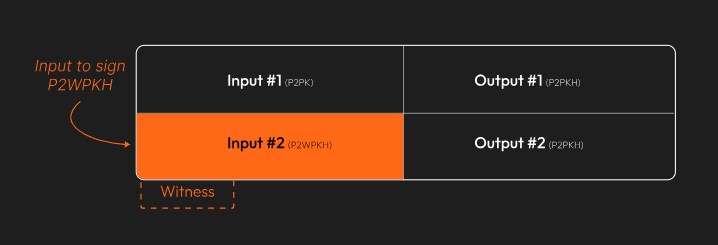
Since this example came from one of the BIP-143 test vectors, we know what the final, signed transaction looks like. The goal is to recreate this:
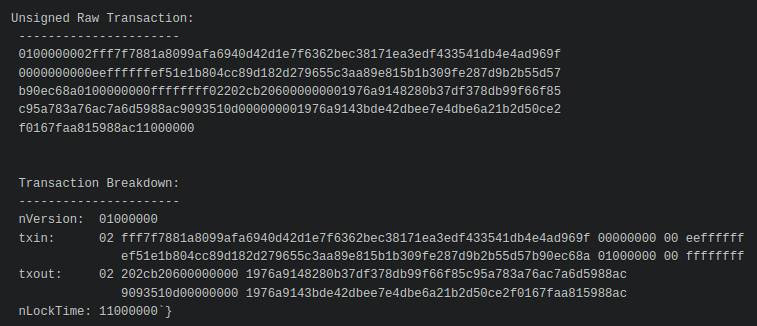
First, we create the base transaction, the transaction without any signatures.
We’ll start with the
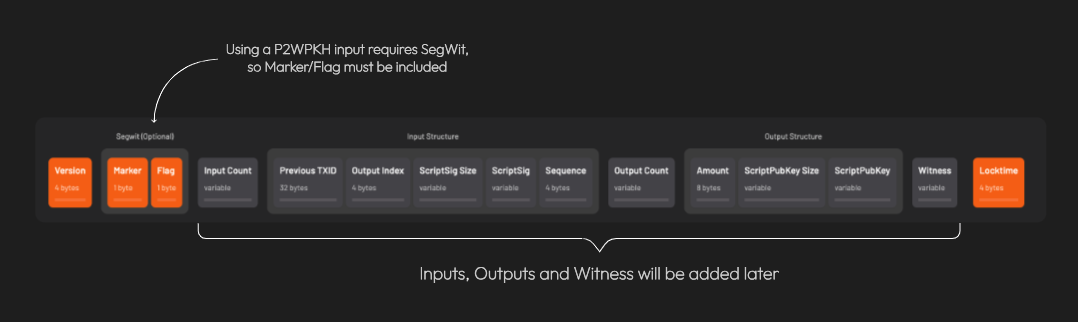
𝐴 𝑛𝑜𝑡𝑒 𝑜𝑛 𝑠𝑒𝑔𝑤𝑖𝑡 𝑣𝑠. 𝑙𝑒𝑔𝑎𝑐𝑦 𝑡𝑟𝑎𝑛𝑠𝑎𝑐𝑡𝑖𝑜𝑛𝑠: 𝐵𝑒𝑐𝑎𝑢𝑠𝑒 𝑎𝑡 𝑙𝑒𝑎𝑠𝑡 𝑜𝑛𝑒 𝑜𝑓 𝑡ℎ𝑒 𝑖𝑛𝑝𝑢𝑡𝑠 𝑖𝑠 𝑠𝑒𝑔𝑤𝑖𝑡 (𝑛𝑎𝑡𝑖𝑣𝑒 𝑜𝑟 𝑤𝑟𝑎𝑝𝑝𝑒𝑑), 𝑡ℎ𝑒 𝑡𝑟𝑎𝑛𝑠𝑎𝑐𝑡𝑖𝑜𝑛 𝑖𝑠 𝑎𝑙𝑠𝑜 𝑐𝑜𝑛𝑠𝑖𝑑𝑒𝑟𝑒𝑑 𝑠𝑒𝑔𝑤𝑖𝑡.
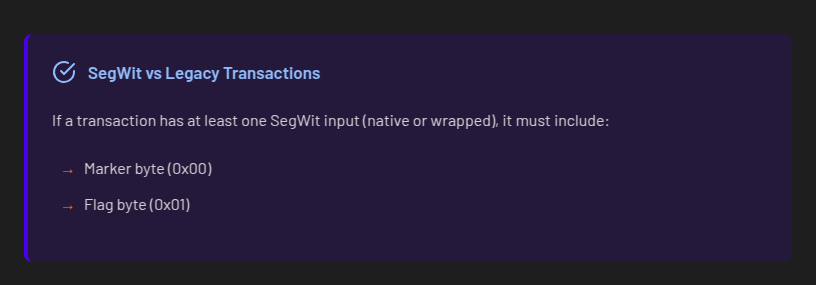
Here’s what we have so far:
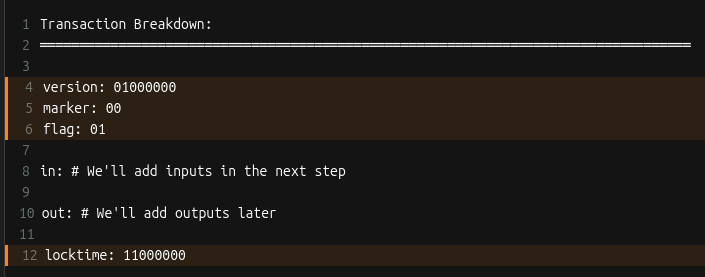
Let’s add inputs! Recall that all inputs come from existing transactions. That means for each input, we need to find the transaction it came from and get:
𝐖𝐡𝐚𝐭’𝐬 𝐚𝐧 𝐨𝐮𝐭𝐩𝐮𝐭 𝐢𝐧𝐝𝐞𝐱?
Every transaction has a list of outputs. The “output index” is a way to reference a specific output from the list.
We need to ask, "from a transaction’s list of outputs, which one corresponds to the input I care about?”
For each input, two more things are needed: the 𝐬𝐜𝐫𝐢𝐩𝐭𝐒𝐢𝐠 (placeholder for data required to spend the input), and a 𝐬𝐞𝐪𝐮𝐞𝐧𝐜𝐞 𝐧𝐮𝐦𝐛𝐞𝐫 (usually 0xFFFFFFFF)
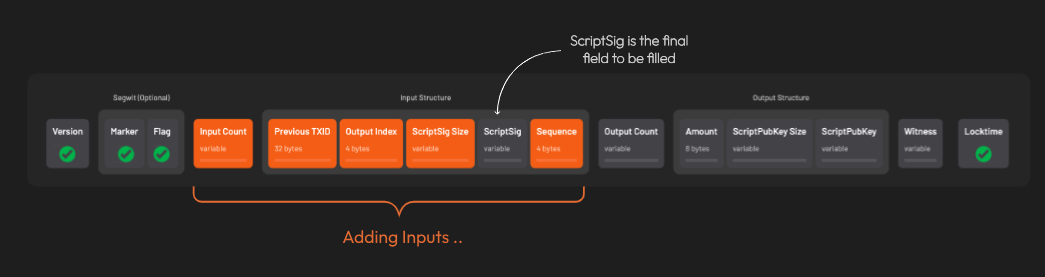
After adding all the inputs, the transaction looks like this:
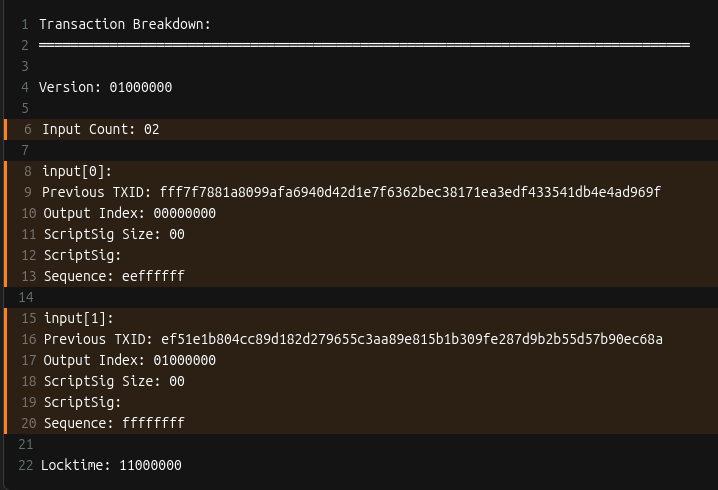
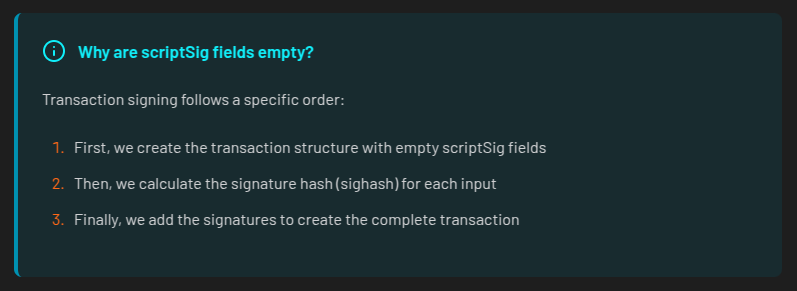
Remember when we said the scriptSig would be a placeholder? Here’s why those fields are currently empty:
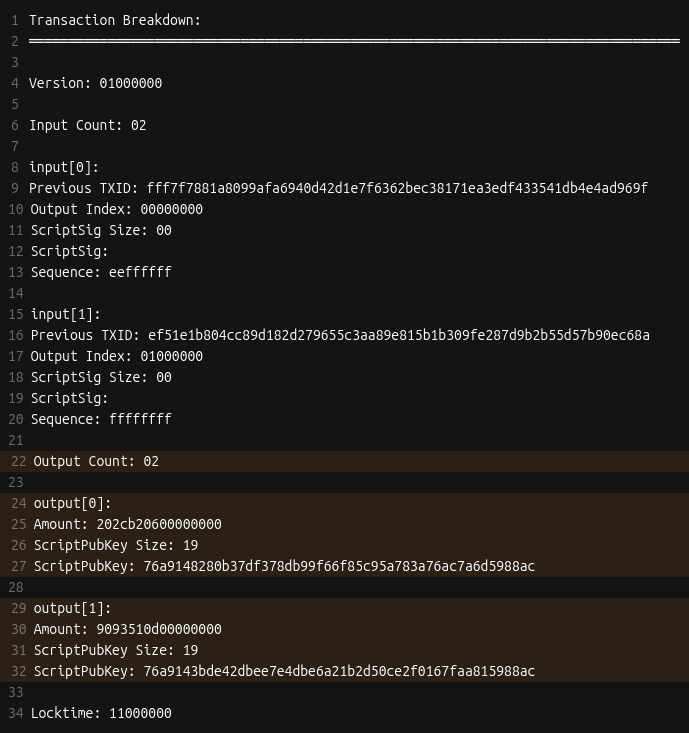
Time to add outputs! For each output, we include the

Things are starting to come together!
A few more things are needed before we can get to signing. First is setting up the 𝐰𝐢𝐭𝐧𝐞𝐬𝐬 field.
This is where the signature and corresponding public key go for segwit transactions.
The witness field starts off empty. This is different from legacy transactions where signatures are placed directly in the scriptSig field.

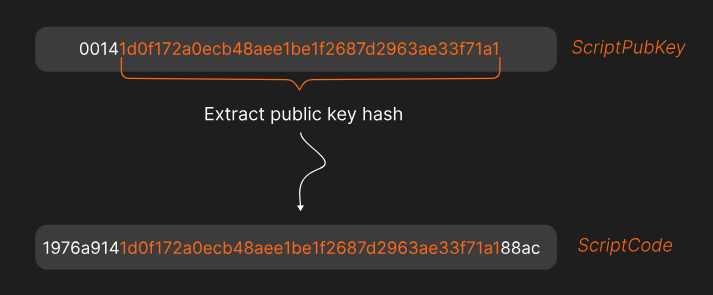
The next thing that’s needed is the 𝐬𝐜𝐫𝐢𝐩𝐭𝐂𝐨𝐝𝐞.
The scriptCode for a P2WPKH (pay-to-witness-public-key-hash) input is:

𝑊ℎ𝑎𝑡’𝑠 𝑡ℎ𝑎𝑡 20 𝑏𝑦𝑡𝑒 𝑝𝑢𝑏𝑘𝑒𝑦 ℎ𝑎𝑠ℎ?
𝐸𝑎𝑟𝑙𝑖𝑒𝑟 𝑤𝑒 𝑠𝑎𝑤 𝑒𝑎𝑐ℎ 𝑜𝑢𝑡𝑝𝑢𝑡 ℎ𝑎𝑠 𝑎 𝑠𝑐𝑟𝑖𝑝𝑡𝑃𝑢𝑏𝐾𝑒𝑦 (𝑟𝑢𝑙𝑒𝑠 𝑓𝑜𝑟 ℎ𝑜𝑤 𝑡𝑜 𝑠𝑝𝑒𝑛𝑑 𝑡ℎ𝑒 𝑜𝑢𝑡𝑝𝑢𝑡). 𝐴𝑙𝑠𝑜, 𝑟𝑒𝑐𝑎𝑙𝑙 𝑡ℎ𝑎𝑡 𝑡ℎ𝑒 𝑖𝑛𝑝𝑢𝑡 𝑡𝑜 𝑜𝑛𝑒 𝑡𝑟𝑎𝑛𝑠𝑎𝑐𝑡𝑖𝑜𝑛 𝑖𝑠 𝑡ℎ𝑒 𝑜𝑢𝑡𝑝𝑢𝑡 𝑓𝑟𝑜𝑚 𝑎𝑛𝑜𝑡ℎ𝑒𝑟.
𝑇ℎ𝑒 20 𝑏𝑦𝑡𝑒 𝑝𝑢𝑏𝑘𝑒𝑦 ℎ𝑎𝑠ℎ 𝑖𝑠 𝑒𝑥𝑡𝑟𝑎𝑐𝑡𝑒𝑑 𝑓𝑟𝑜𝑚 𝑡ℎ𝑒 𝑐𝑜𝑟𝑟𝑒𝑠𝑝𝑜𝑛𝑑𝑖𝑛𝑔 𝑜𝑢𝑡𝑝𝑢𝑡'𝑠 𝑠𝑐𝑟𝑖𝑝𝑡𝑃𝑢𝑏𝐾𝑒𝑦.
Here’s the 𝐬𝐜𝐫𝐢𝐩𝐭𝐂𝐨𝐝𝐞 for the example we’re working on:
Lastly, three important hashes are required.
The first is 𝐡𝐚𝐬𝐡𝐏𝐫𝐞𝐯𝐨𝐮𝐭𝐬. It’s the double SHA256 hash of all input outpoints (outpoint = the transaction id + output index)
The second is 𝐡𝐚𝐬𝐡𝐒𝐞𝐪𝐮𝐞𝐧𝐜𝐞, the double SHA256 hash of all input sequence numbers.
The third is 𝐡𝐚𝐬𝐡𝐎𝐮𝐭𝐩𝐮𝐭𝐬, the double SHA256 hash of all outputs.
That’s everything (finally!). Let’s put it all together into something that can be signed!
When signing a transaction, the spender actually signs a hash of the transaction data, not the entire transaction itself. This hash is called the 𝐬𝐢𝐠𝐡𝐚𝐬𝐡.
The data used to create the sighash is called the 𝐩𝐫𝐞𝐢𝐦𝐚𝐠𝐞.
For a transaction input, the preimage is made of these items:
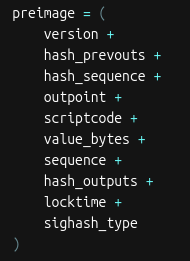
The sighash_type indicates which parts of the transaction the signature is committing to.
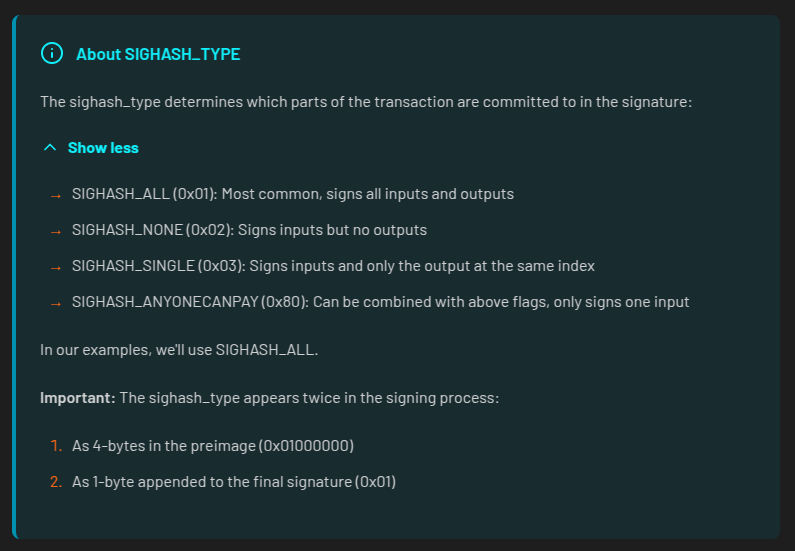
After hashing the preimage twice with SHA-256, we’re left with the sighash.
At last! It’s time to do some signing!
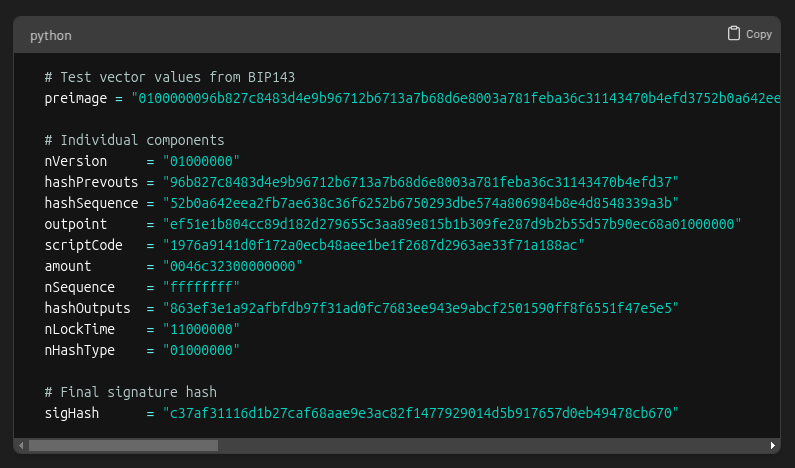
There are a few steps for signing a segwit (v0) transaction.
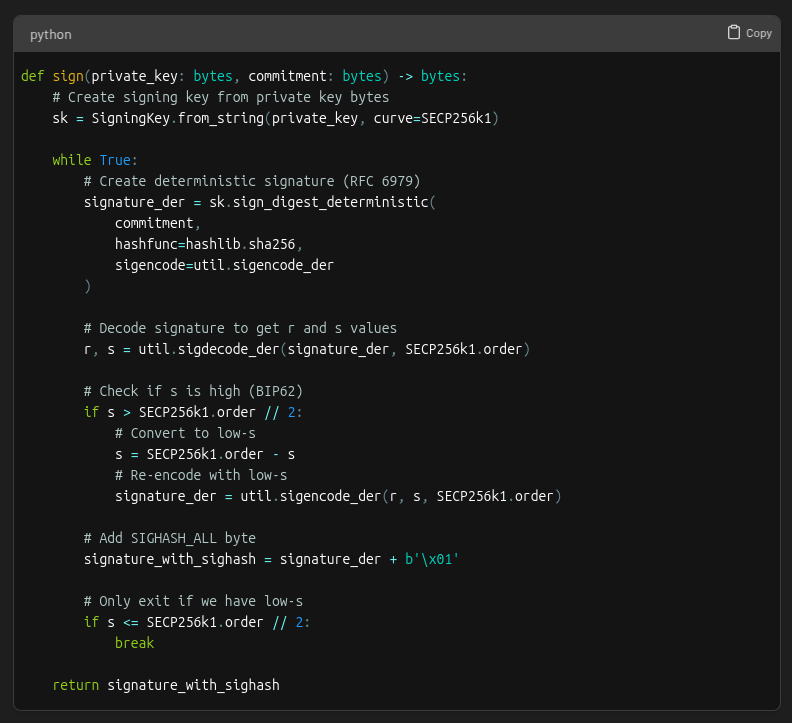
First, the signer’s private key is used to create an ECDSA signature for the sighash.
The resulting signature has two parts, 𝑟 and 𝑠.
In ECDSA, there are actually two valid s values for every signature: a "high" value and a "low" value.
Both are mathematically valid, but bitcoin requires using the low s value to prevent transaction malleability (that means altering a transaction's ID!)
After selecting the low s value, the signature must be encoded into DER format. This is how it’s structured:
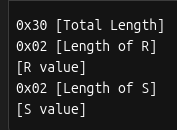
And here’s what the DER encoded signature looks like for our example:
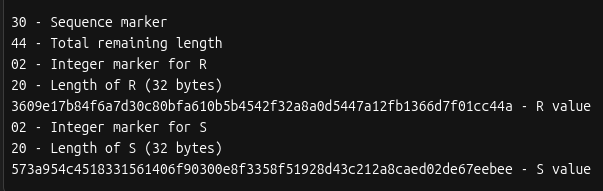
The last step is to add a byte at the end for the sighash type. If we look back at the preimage made earlier we see this example is using SIGHASH_ALL (0x01).
The full code for the signing step looks like this:
Remember the transaction witness field we set space aside for? It’s now time to put the signature in it 🚀

This is how the witness field is structured:

Which works out to be this for our example:
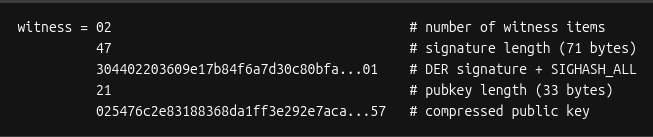
With the completion of the witness field, the transaction is now signed!

This is what the final signed transaction hex looks like broken down:
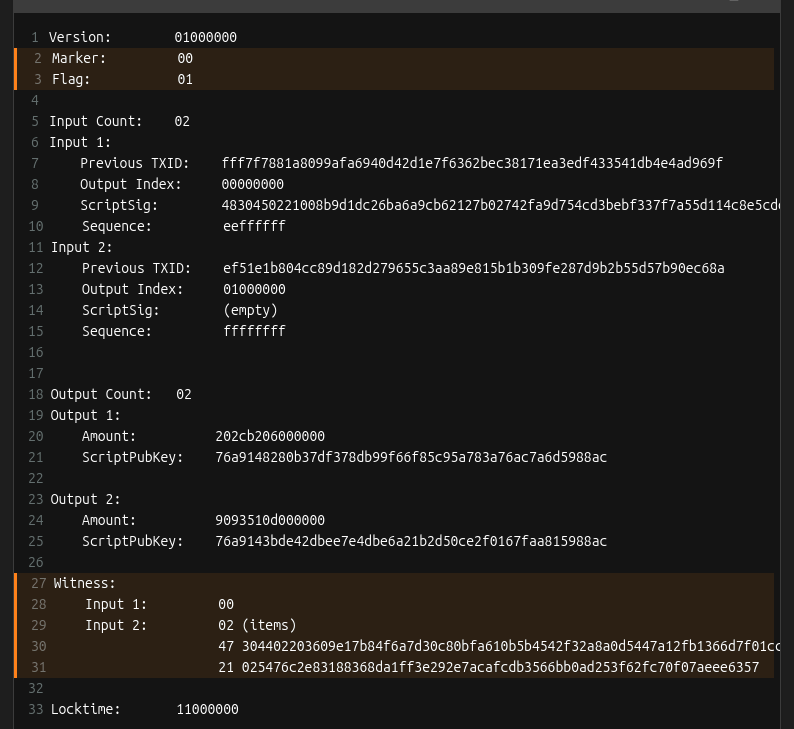
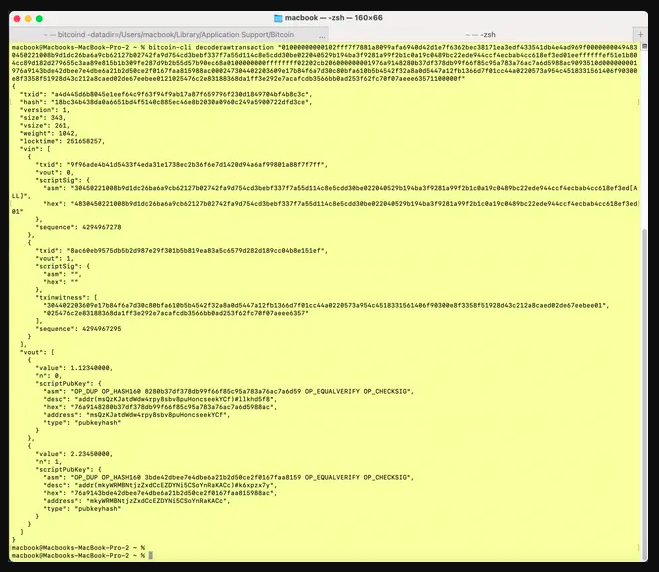
Bonus: You can use the Bitcoin Core CLI decoderawtransaction command to examine all the parts of the raw transaction hex
If you made it to the end, give yourself a pat on the back. If you enjoyed it, be sure to like this post so we know to make more like it!
This material is from Decoding Bitcoin, your go-to resource for understanding bitcoin, #privacy, and #decentralization.
You can visit https://bitcoindevs.xyz/decoding/transaction-signing for the full lesson with all the code examples, as well as more free, interactive content.
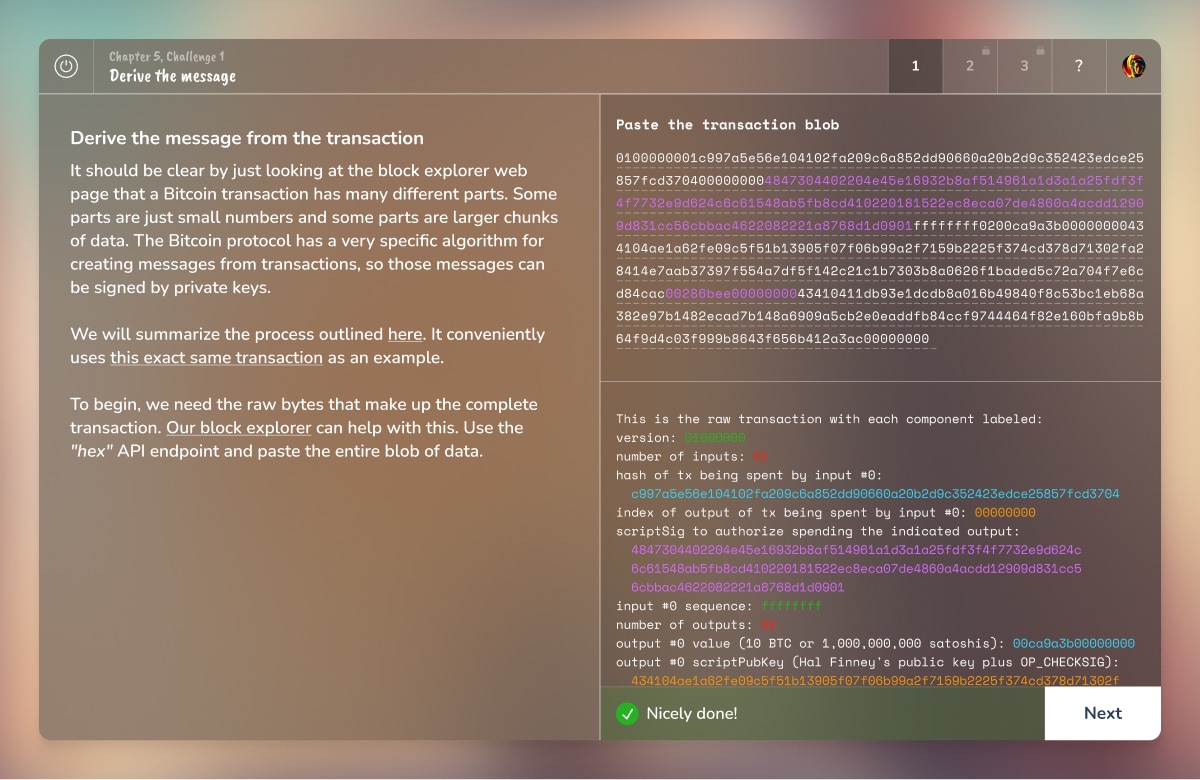
For more of a challenge, play chapters 4, 5, and 6 of
(https://savingsatoshi.com) to learn about public-private key cryptography, digital signatures, and transaction building 😺
Hope you learned something new about transaction signing. If you enjoyed this, share it with a friend and don’t forget to follow us,
for more content like this.
Thanks for reading!
2/21/2025, 6 engagements
Are you tired of searching for "lightning" only to get results about sparks in the sky and ice hockey teams in Florida?
So are we. That's why we built Bitcoin Search, which pulls from a curated list of credible #bitcoin tech sources.
We've built the world's largest collection of technical bitcoin-related resources: articles, podcast transcripts, blog posts, and more.
Sources are regularly monitored to make sure your search results are up-to-date.
We hand-pick sources for their contributions to technical bitcoin concepts. Examples include the Bitcoin-dev Mailing List, LN dev Mailing List, Bitcoin Optech, and many more.
Bookmark it and try it out today!

What's the deal with #bitcoin fees? How are they calculated? Where do they go? Let's have a look with a #DecodingBitcoin post:
A transaction's fee is equal to the total amount of bitcoin in the inputs, minus the total amount of bitcoin in the outputs.

Here's how to calculate the fee for this transaction: https://mempool.space/tx/c27c4d2236fce2a7542e024408d7f89b95e50e42a2c3d10be499c3102ccb45ef
Fee = Input - (Output1 + Output2) Fee = 299.99430000 - (0.00140000 + 299.99240000) Fee = 299.99430000 - 299.99380000 Fee = 0.00050000 Fee = 50,000 sats
Remember: Sum(Inputs) should always be greater than Sum(Outputs)

Fees incentivise miners to include transactions in blocks. Without fees, miners would have little reason to put transactions into blocks!
In addition to fees, miners also receive a block reward.
Total miner revenue = fees + block reward

How do miners decide what transactions go into a block?
The short answer is miners will usually maximize revenue by prioritizing transactions with the highest fee rate (we've got a whole lesson fee rates coming!)

While miners can choose which transactions to include based on fees, there's a minimum threshold, a "minimum relay fee" that must be met just for a transaction to be relayed through the network.
Transactions below this threshold are rejected by nodes. It helps prevent spam and DoS attacks on the network

This brings us to an important question: What happens if you submit a transaction with a fee rate above the minimum but still too low for current network conditions?
That transaction could sit in the mempool for hours because the fee rate is too low for the high level of network activity. Even if you met the minimum, there can still be plenty of transactions with higher fee rates than yours, ones that miners will choose first.

At this point, you have two main ways to "unstick" it:
That's all for now! We'll dive deeper into fee rates, RBF, and CPFP in a future post.
This material is from Decoding Bitcoin, your go-to resource for understanding #bitcoin, privacy, and decentralization.
If you enjoyed it, visit https://bitcoindevs.xyz/decoding for the full lesson, and more free, interactive content!
And don't forget to follow us for more posts about bitcoin tech and tools to help you in your developer journey 🚀
1/14/2025, 6 engagements
Let's talk about the 2 ways to track user balances on decentralized networks. Time for a #decodingbitcoin post:
Account Model (Ethereum): Tracks balances like a bank ledger (simple and intuitive).
UTXO Model (Bitcoin): Tracks specific unspent outputs from transactions (complex but powerful)

The account model is like your bank statement. Simple to understand and works well with smart contracts. The downside is it's less private and can be vulnerable to replay attacks.

The UTXO model is like bills in a wallet. UTXOs (unspent transaction outputs) can only be spent once. Each transaction creates new UTXOs, and your balance is the sum of all your unspent UTXOs

This model has better privacy, prevents double spending, and allows for parallel transaction processing. The cons are it's more difficult to understand, is harder for complex applications, and requires UTXO management.
Here's a comparison chart of the two models:

This material is from Decoding Bitcoin, your go-to resource for understanding #bitcoin, privacy, and decentralization.
If you enjoyed it, visit https://bitcoindevs.xyz/decoding for the full lesson, and follow us for more free educational #bitcoin content!
1/10/2025, 12 engagements
Want to contribute to #Bitcoin FOSS development
But don't know where to start?
📢 Introducing Bitcoin Good First Issues!
A tool designed specifically for devs just entering bitcoin development.
https://bitcoindevs.xyz/good-first-issues
🤔 We know it’s hard to guess which projects to start with and what issues to tackle.
Bitcoin Good First Issues gathers beginner-friendly issues labelled Bug, Help Wanted, and (heh) Good First Issues.
It pulls them live for your from vetted Free Open Source Software projects.
🛠️ Why Give It a Go?
Whether you're just starting or already a developer, Bitcoin Good First Issues is built to accelerate your contributions.
Give it a roll and make a difference! Let’s build the future of bitcoin together.
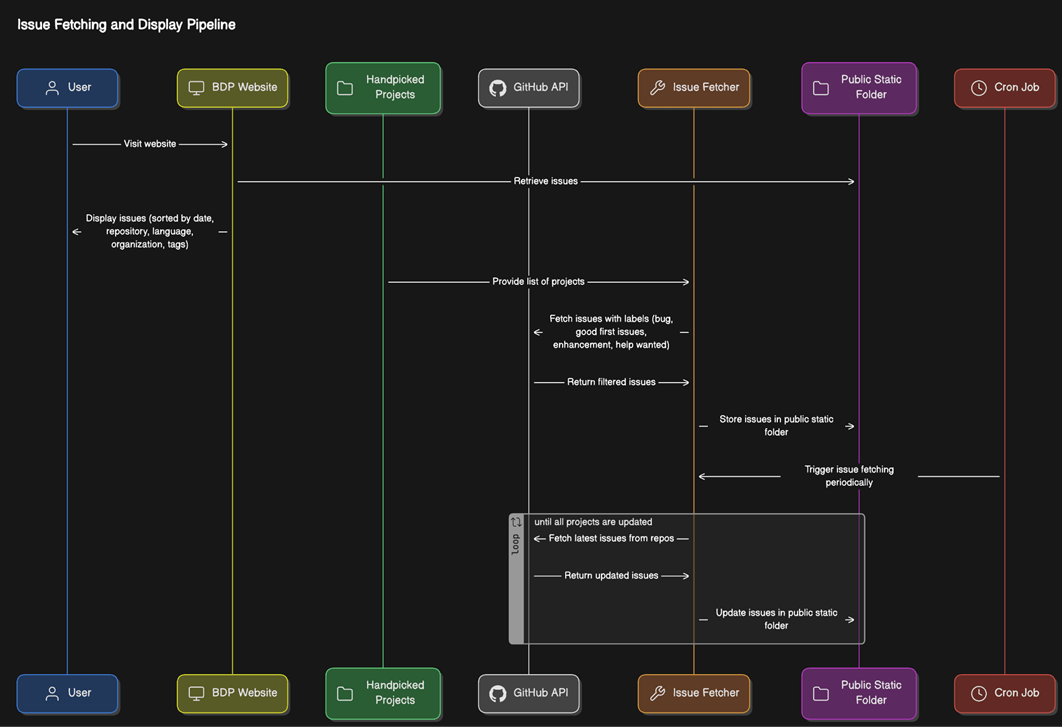
👩💻 Check the image below to learn how the data flow works:
🖤 Biggest thanks to our team!
📃 Examples of vetted FOSS projects in Bitcoin Good First Issues
We're looking forward to your feedback!
